If SMBv1 is supported, an attacker with network access may exploit legacy protocol weaknesses to move laterally or execute code, resulting in loss of confidentiality, integrity, and availability across connected systems.
Example Requirement
The system shall not support or negotiate SMB version 1 for any inbound or outbound network communications.
Implementation Requirements
- Ensure SMBv1 feature is not installed
- Ensure SMB server and client cannot negotiate SMBv1
- Confirm no fallback behavior exists
Disable-WindowsOptionalFeature -Online -FeatureName SMB1Protocol -NoRestartTest Cases
| Test ID | Requirement | Test Type | Method | Expected Result | Evidence |
|---|---|---|---|---|---|
| SMB-V-01 | SMBv1 not supported | Verification | Windows feature inspection | SMBv1 not installed | Screenshot |
| SMB-V-02 | SMBv1 disabled | Verification | PowerShell capability check | SMBv1 = False | Script output |
| SMB-V-03 | No SMBv1 negotiation | Validation | Legacy SMBv1 client test | Connection fails | Logs |
| SMB-V-04 | No downgrade | Validation | Forced SMBv1 negotiation | Negotiation rejected | Network capture |
Test Evidence Examples
| Test ID | Result | Evidence |
|---|---|---|
| SMB-V-01 | ✅ COMPLIANT | 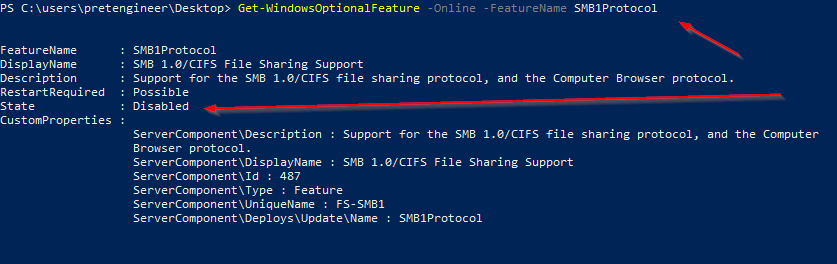 Windows feature inspection showing SMBv1 not installed |
| SMB-V-02 | ✅ COMPLIANT | 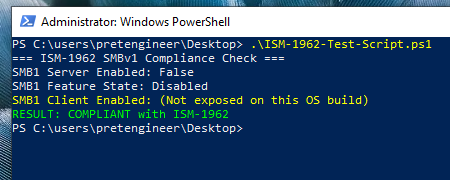 PowerShell capability check output showing SMBv1 disabled - Test Passed |
| SMB-V-03 | ✅ COMPLIANT | |
| MS17-010 | ✅ NOT VULNERABLE | |
Verification and Validation
Methods:
SMB protocol configuration checks
Evidence or Artifacts:
PowerShell output, screenshot
Validation:
- Attempt an SMBv1 connection
- Observe failure
Expected Outcome:
- SMBv1 connection fails
- Events logged
Test Script
Write-Host "=== ISM-1962 SMBv1 Compliance Check ==="

# Check SMB Server Configuration
$serverConfig = Get-SmbServerConfiguration
Write-Host "SMB1 Server Enabled:" $serverConfig.EnableSMB1Protocol

# Check Windows Feature State
$feature = Get-WindowsOptionalFeature -Online -FeatureName SMB1Protocol
Write-Host "SMB1 Feature State:" $feature.State

# Check SMB Client Configuration (only if property exists)
$clientConfig = Get-SmbClientConfiguration
$clientProp = $clientConfig.PSObject.Properties['EnableSMB1Protocol']
$clientSMB1 = if ($clientProp) { $clientProp.Value } else { $null }

if ($null -eq $clientSMB1) {
    Write-Host "SMB1 Client Enabled: (Not exposed on this OS build)" -ForegroundColor Yellow
} else {
    Write-Host "SMB1 Client Enabled:" $clientSMB1
}

# Compliance Result
$clientCompliant  = if ($null -eq $clientSMB1) { $feature.State -eq "Disabled" } else { $clientSMB1 -eq $false }
$featureCompliant = @("Disabled","DisabledWithPayloadRemoved") -contains $feature.State

if (
    $serverConfig.EnableSMB1Protocol -eq $false -and
    $clientCompliant -and
    $featureCompliant
) {
    Write-Host "RESULT: COMPLIANT with ISM-1962" -ForegroundColor Green
} else {
    Write-Host "RESULT: NON-COMPLIANT with ISM-1962" -ForegroundColor Red
}