Introduction
The Server Message Block version 1 (SMBv1) protocol was designed back in the 1980s, and it ended up becoming one of the biggest attack vectors in modern cybersecurity. Its vulnerabilities enabled EternalBlue, an exploit that powered some of the most devastating attacks of the 2010s, including WannaCry and NotPetya.
This post looks at SMBv1’s design flaws, how EternalBlue weaponized them, and why legacy protocols are still causing problems today.
What is SMBv1?
SMB (Server Message Block) is a network file sharing protocol that lets applications read and write files and request services from servers across a network. SMBv1 was the original version, introduced by IBM in the mid-1980s and later adopted by Microsoft for Windows networking.
Key Characteristics
- Age: Designed in the 1980s, before ‘cyber’ and information security
- Purpose: File and printer sharing over local networks
- Default: Enabled by default on Windows systems until Windows 10 version 1709
- Legacy: Superseded by SMBv2 (2006) and SMBv3 (2012)
Why SMBv1 Was Problematic
SMBv1 was designed for a different era, where networks were smaller, more trusted, and threats weren’t as sophisticated. There’s a few fundamental design issues that made it vulnerable:
1. Lack of Modern Authentication
SMBv1 relied on older authentication that was vulnerable to:
- NTLMv1: Weak hashing that could be cracked pretty easily
- Plaintext password transmission: In some configs, credentials could be intercepted
- No encryption by default: Data sent in cleartext
2. Buffer Overflow Vulnerabilities
The protocol implementation had multiple buffer overflow vulnerabilities:
- Not enough input validation
- Fixed-size buffers that could be overflowed
- Memory corruption that could lead to remote code execution
3. No Message Signing
Early SMBv1 implementations lacked message signing, making it vulnerable to:
- Man-in-the-middle attacks
- Message tampering
- Replay attacks
EternalBlue: The Exploit
EternalBlue (CVE-2017-0144) was a remote code execution vulnerability in Microsoft’s SMBv1 implementation. The NSA discovered it, then the Shadow Brokers group leaked it in 2017, and it became one of the most widely exploited vulnerabilities in cybersecurity history.
Technical Details
EternalBlue exploited a buffer overflow in how SMBv1 handled certain message types:
- Buffer Overflow: The exploit sent crafted SMBv1 messages that overflowed fixed-size buffers
- Memory Corruption: This let attackers overwrite memory structures
- Code Execution: By crafting the overflow carefully, attackers could execute arbitrary code
- No Authentication Required: Could be exploited without any authentication
Why It Was So Dangerous
- Wormable: Could spread automatically across networks
- No User Interaction: Required no user action to exploit
- Remote Execution: Could execute code remotely without local access
- Widespread: Affected all Windows systems with SMBv1 enabled
ATT&CK Technique T1021.002: Lateral Movement via SMB

The WannaCry Outbreak
In May 2017, WannaCry ransomware leveraged EternalBlue to spread globally:
- Scale: Infected over 300,000 computers across 150 countries
- Speed: Spread rapidly across networks using EternalBlue
- Impact: Disrupted hospitals, businesses, and critical infrastructure
- Cost: Estimated billions in damages
WannaCry showed how a single protocol vulnerability could enable global-scale attacks when combined with ransomware.
NotPetya: Even More Destructive
NotPetya (June 2017) also used EternalBlue but was even more destructive:
- Wiper Malware: Disguised as ransomware but designed to destroy data
- Supply Chain Attack: Initially spread through Ukrainian accounting software
- EternalBlue Propagation: Used EternalBlue to spread across networks
- Estimated Damage: Over $10 billion globally
Microsoft’s Response
Microsoft responded to EternalBlue with:
MS17-010 Patch
Released in March 2017, before the Shadow Brokers leak:
- Fixed the buffer overflow vulnerability
- Updated the SMBv1 implementation
- Needed immediate patching
SMBv1 Deprecation
Microsoft began deprecating SMBv1:
- Windows 10 version 1709: SMBv1 disabled by default
- Windows Server 2016: SMBv1 disabled by default
- Windows Server 2019: SMBv1 removed entirely
- Windows 11: SMBv1 completely removed
Guidance for Organizations
Microsoft recommended:
- Disabling SMBv1 entirely
- Using SMBv2 or SMBv3 instead
- Implementing network segmentation
- Applying security patches promptly
Why SMBv1 Persists
Even though it’s deprecated and vulnerable, SMBv1 is still out there:
Legacy Systems
- Older Windows systems: Windows XP, Windows Server 2003
- Embedded devices: Printers, NAS devices, IoT devices
- Industrial systems: SCADA systems, manufacturing equipment
Compatibility Requirements
- Some applications require SMBv1 for compatibility
- Legacy software dependencies
- Third-party devices that only support SMBv1
Lack of Awareness
- Organizations don’t realize SMBv1 is enabled
- Misconfigurations in network settings
- Default installs that haven’t been updated
Detection and Mitigation
Detection
- Network scanning: Identify systems with SMBv1 enabled
- Traffic analysis: Monitor for SMBv1 protocol usage
- Vulnerability scanning: Check for MS17-010 patch status
Mitigation Strategies
- Disable SMBv1: Remove or disable SMBv1 on all systems
- Patch Management: Ensure MS17-010 and subsequent patches are applied
- Network Segmentation: Isolate systems that require SMBv1
- Use SMBv3: Migrate to SMBv3 with encryption enabled
- Firewall Rules: Block SMB ports (445/TCP, 139/TCP) at network boundaries
- Monitoring: Implement network monitoring for SMBv1 traffic
Control Implementation Guidance
If SMBv1 is supported, an attacker with network access may exploit legacy protocol weaknesses to move laterally or execute code, resulting in loss of confidentiality, integrity, and availability across connected systems.
Example Requirement
The system shall not support or negotiate SMB version 1 for any inbound or outbound network communications.
Implementation Requirements
- Ensure SMBv1 feature is not installed
- Ensure SMB server and client cannot negotiate SMBv1
- Confirm no fallback behavior exists
Disable-WindowsOptionalFeature -Online -FeatureName SMB1Protocol -NoRestartVerification and Validation
Methods:
SMB protocol configuration checks
Evidence or Artifacts:
PowerShell output, screenshot
Validation:
- Attempt an SMBv1 connection
- Observe failure
Expected Outcome:
- SMbv1 connection fails
- Events logged
Test Evidence
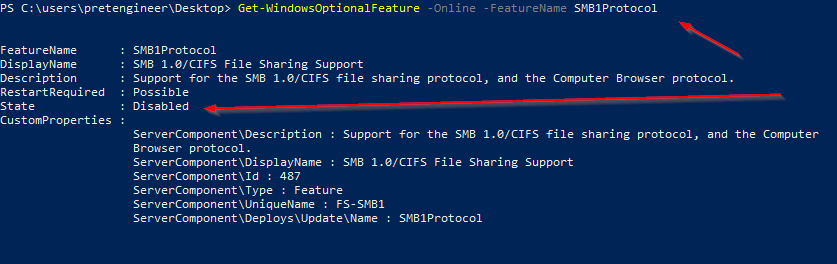
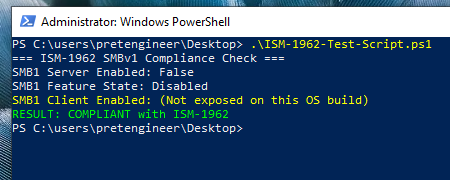
Test Script
Write-Host "=== ISM-1962 SMBv1 Compliance Check ==="

# Check SMB Server Configuration
$serverConfig = Get-SmbServerConfiguration
Write-Host "SMB1 Server Enabled:" $serverConfig.EnableSMB1Protocol

# Check Windows Feature State
$feature = Get-WindowsOptionalFeature -Online -FeatureName SMB1Protocol
Write-Host "SMB1 Feature State:" $feature.State

# Check SMB Client Configuration (only if property exists)
$clientConfig = Get-SmbClientConfiguration
$clientProp = $clientConfig.PSObject.Properties['EnableSMB1Protocol']
$clientSMB1 = if ($clientProp) { $clientProp.Value } else { $null }

if ($null -eq $clientSMB1) {
  Write-Host "SMB1 Client Enabled: (Not exposed on this OS build)" -ForegroundColor Yellow
} else {
  Write-Host "SMB1 Client Enabled:" $clientSMB1
}

# Compliance Result
$clientCompliant  = if ($null -eq $clientSMB1) { $feature.State -eq "Disabled" } else { $clientSMB1 -eq $false }
$featureCompliant = @("Disabled","DisabledWithPayloadRemoved") -contains $feature.State

if (
  $serverConfig.EnableSMB1Protocol -eq $false -and
  $clientCompliant -and
  $featureCompliant
) {
  Write-Host "RESULT: COMPLIANT with ISM-1962" -ForegroundColor Green
} else {
  Write-Host "RESULT: NON-COMPLIANT with ISM-1962" -ForegroundColor Red
}
Modern Alternatives: SMBv2 and SMBv3
SMBv2 (2006)
- Improved performance and security
- Better message signing
- More efficient protocol design
SMBv3 (2012)
- End-to-end encryption: Data encrypted in transit
- Improved authentication: Stronger security mechanisms
- Better performance: Optimized for modern networks
- Resilience: Better handling of network interruptions
Conclusion
SMBv1’s vulnerabilities, exploited through EternalBlue, showed how legacy protocols can enable devastating attacks. The WannaCry and NotPetya outbreaks showed the real-world impact of unpatched vulnerabilities and legacy protocols that are still enabled.
While SMBv1 is mostly deprecated in modern Windows systems, it’s still hanging around in legacy environments and embedded devices. Organizations need to:
- Identify systems still using SMBv1
- Disable SMBv1 wherever possible
- Migrate to SMBv3 with encryption
- Segment networks to contain legacy systems
- Monitor for SMBv1 usage and exploitation attempts
The SMBv1/EternalBlue story is a reminder that security is an ongoing process, not a one-time thing. Legacy protocols, unpatched systems, and default configs keep posing risks that need constant attention and proactive management.
References
Australian Cyber Security Centre, Australian Government Information Security Manual (ISM), Control ISM-1962 – “SMB version 1 is not used on networks”.
Primary policy authority mandating the prohibition of SMBv1 within Australian Government systems.Microsoft, Stop Using SMB1.
Microsoft security guidance explicitly recommending removal of SMBv1 due to inherent design weaknesses and active exploitation history.WannaCry, Global Ransomware Incident (2017).
Demonstrated real-world exploitation of SMBv1 (EternalBlue), resulting in rapid wormable spread and widespread operational impact.