Overview
This HTB Sherlock scenario focuses on Sysmon log analysis to detect and investigate malicous activity from an UltraVNC-based intrusion campaign. As a DFIR analyst, we’ll examine Windows Event Logs to identify indicators of compromise (IOCs), trace the attack chain, and understand how the threat actor gained initial access and maintained persistence.
The investigation centers around analyzing Sysmon Event IDs to answer key questions about the intrusion timeline, malicious processes, and distribution mechanisms.
Investigation Environment
- Log File:
Microsoft-Windows-Sysmon-Operational.evtx
Task 1: File Creation Events Analysis
Question: How many Event logs are there with Event ID 11?
Objective: Identify the volume of file creation events, which can indicate malicious file drops or data exfiltration.
┌ 2813308004@Fred  unit42  error

└ $ (Get-WinEvent -Path ".Microsoft-Windows-Sysmon-Operational.evtx" | Where-Object { $_.Id -eq 11 }).count

56
File Creation Events Analysis
Answer: 56
Task 2: Identifying the Initial Malicious Process
Question: What is the malicious process that infected the victim’s system?
Objective: Trace the process excecution chain to identify the initial entry point and understand the attack vector.
Key Findings:
The analysis reveals a suspicious process execution chain:
Image       : C:\Windows\SysWOW64\msiexec.exe
CommandLine : "C:\Windows\system32\msiexec.exe" /i "C:\Users\CyberJunkie\AppData\Roaming\Photo and Fax Vn\Photo and vn 1.1.2\install\F97891C\main1.msi"
              AI_SETUPEXEPATH=C:\Users\CyberJunkie\Downloads\Preventivo24.02.14.exe.exe SETUPEXEDIR=C:\Users\CyberJunkie\Downloads\ EXE_CMD_LINE="/exenoupdates
              /forcecleanup  /wintime 1707880560  " AI_EUIMSI=""
ParentImage : C:\Users\CyberJunkie\Downloads\Preventivo24.02.14.exe.exe
Answer: C:\Users\CyberJunkie\Downloads\Preventivo24.02.14.exe.exe
Analysis:
-
Initial Vector: The malicious executable
Preventivo24.02.14.exe.exewas executed from the Downloads folder, suggesting a phishing or drive-by download attack vector. -
Execution Chain:
- Parent:
Preventivo24.02.14.exe.exe(malicious dropper) - Child:
msiexec.exe(legitimate Windows installer) - Payload:
main1.msiinstalled toAppData\Roaming\Photo and Fax Vn\
- Parent:
-
Tactics Observed:
- Masquerading: The executable uses a legitimate-sounding name (“Preventivo” = Italian for “Quote/Estimate”)
- Living off the Land: Leverages
msiexec.exe(LOLBin) to install the payload - Persistence Mechanism: Installation to
AppData\Roamingsuggests user-level persistence
-
IOCs:
- File Path:
C:\Users\CyberJunkie\Downloads\Preventivo24.02.14.exe.exe - Installation Path:
C:\Users\CyberJunkie\AppData\Roaming\Photo and Fax Vn\Photo and vn 1.1.2\install\F97891C\main1.msi - Command Line Arguments:
/exenoupdates /forcecleanup /wintime 1707880560
- File Path:
Task 3: Cloud Storage Distribution Analysis
Question: Which Cloud drive was used to distribute the malware?
Objective: Identify the command and control (C2) infrastructure and distribution mechanism by analyzing network indicators.
Analysis Approach:
To identify the cloud storage service used for distribution, we examine DNS queries around the time of malicious activity. DNS queries can reveal:
- C2 infrastructure
- Data exfiltration endpoints
- Malware distribution sources
Key Finding:
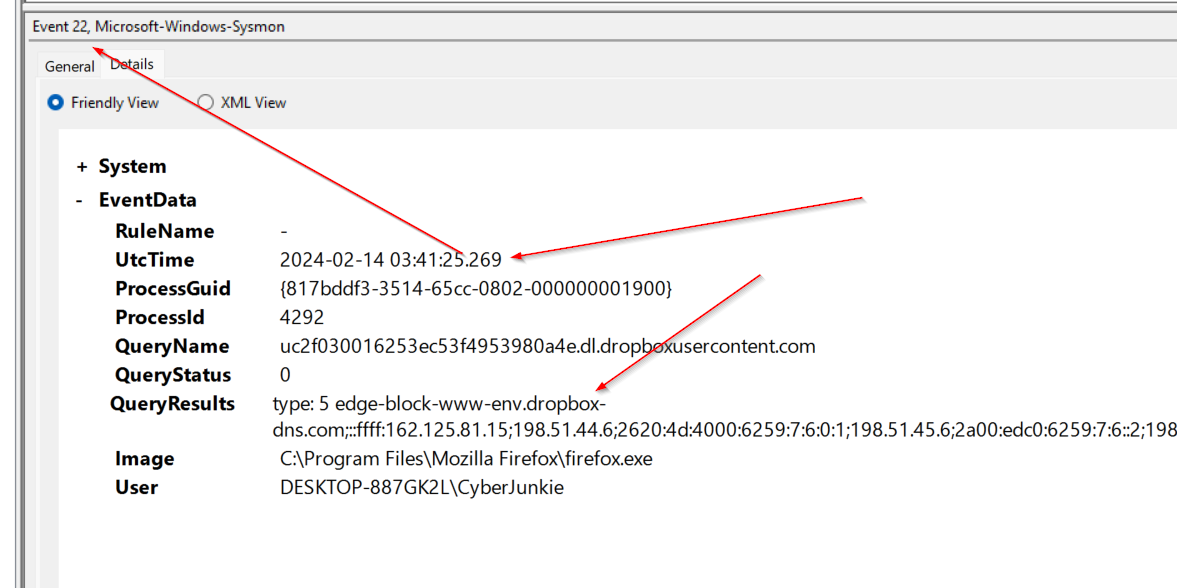
The DNS query analysis reveals:
QueryResults type: 5 edge-block-www-env.dropbox-dns.com
IP Addresses: ::ffff:162.125.81.15; 198.51.44.6; 2620:4d:4000:6259:7:6:0:1;
              198.51.45.6; 2a00:edc0:6259:7:6::2; 198.51.44.70;
              2620:4d:4000:6259:7:6:0:3; 198.51.45.70; 2a00:edc0:6259:7:6::4
Image: C:\Program Files\Mozilla Firefox\firefox.exe
User: DESKTOP-887GK2L\CyberJunkie
Answer: dropbox
Analysis:
-
Distribution Mechanism: The threat actor used Dropbox as a cloud storage service to host and distribute the malicious payload.
-
Access Method: The DNS query originated from
firefox.exe, indicating the user likely accessed a Dropbox link through a web browser, which then triggered the download ofPreventivo24.02.14.exe.exe. -
Tactics:
- Trusted Service Abuse: Using legitimate cloud storage (Dropbox) to host malware increases the likelihood of bypassing security controls
- Social Engineering: The malicious file was likely shared via a Dropbox link, appearing legitimate to the victim
- Browser-Based Delivery: Leveraging the browser as an initial access vector
-
Network Indicators:
- Domain:
edge-block-www-env.dropbox-dns.com - Multiple IP addresses associated with Dropbox infrastructure
- Query type: 5 (CNAME record)
- Domain:
Task 4: Timestomping Detection
Question: What timestamp was used in Time Stomping for the PDF file? (Format: YYYY-MM-DD HH:MM:SS)
Objective: Identify file timestamp manipulation (timestomping) used to evade detection and make malicious files appear older or blend in with legitimate files.
Analysis Approach:
Timestomping is a technique used by threat actors to modify file timestamps to:
- Make malicious files appear older (pre-dating security tool deployment)
- Blend in with legitimate system files
- Evade timeline-based forensic analysis
- Bypass security controls that check file creation dates
Sysmon Event ID 2 (File creation time changed) can detect this activity when a file’s creation time is modified.
Key Finding:
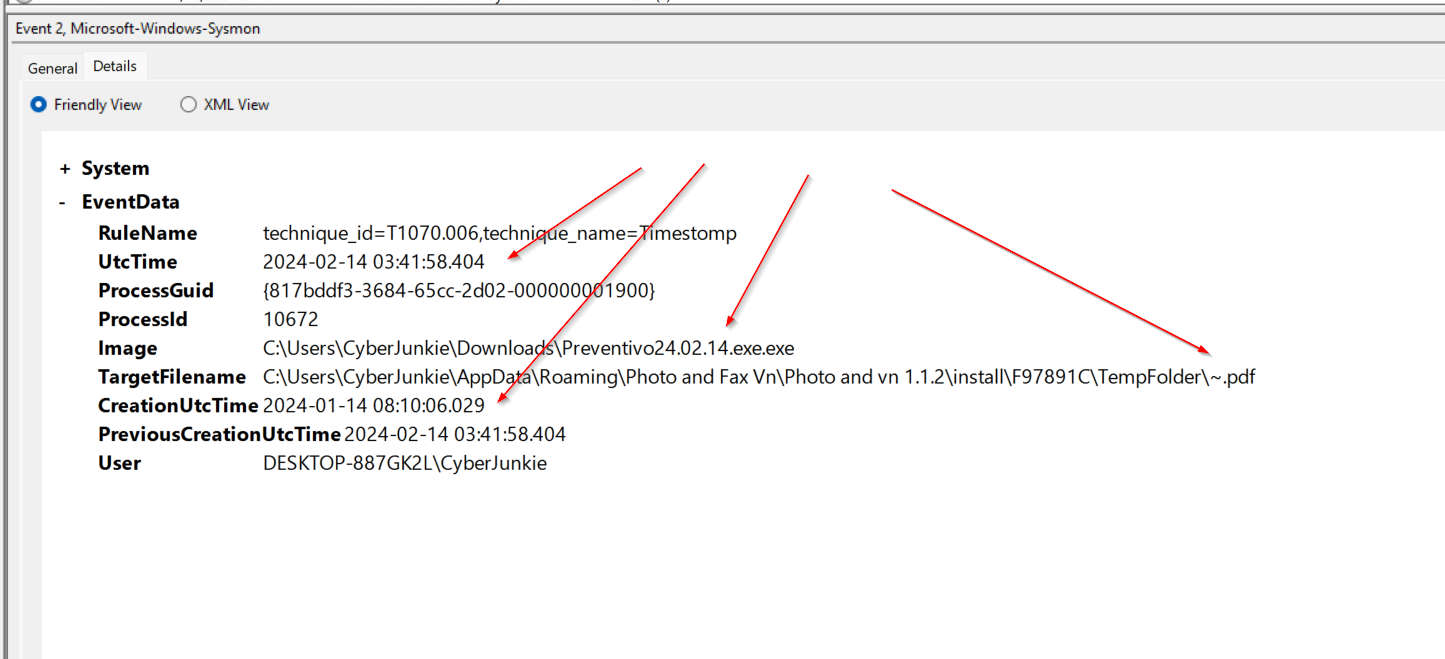
The Sysmon log reveals a timestomping event:
EventID: 2
RuleName: technique_id=T1070.006,technique_name=Timestomp
UtcTime: 2024-02-14 03:41:58.404
ProcessId: 10672
Image: C:\Users\CyberJunkie\Downloads\Preventivo24.02.14.exe.exe
TargetFilename: C:\Users\CyberJunkie\AppData\Roaming\Photo and Fax Vn\Photo and vn 1.1.2\install\F97891C\TempFolder\~.pdf
CreationUtcTime: 2024-01-14 08:10:06.029
PreviousCreationUtcTime: 2024-02-14 03:41:58.404
User: DESKTOP-887GK2L\CyberJunkie
Answer: 2024-01-14 08:10:06.029
Analysis:
-
Timestomping Technique: The malicious process (
Preventivo24.02.14.exe.exe) modified the creation timestamp of a PDF file (~.pdf) from the actual creation time to a date approximately one month earlier. -
Timeline Manipulation:
- Previous Creation Time:
2024-02-14 03:41:58.404(actual time) - Modified Creation Time:
2024-01-14 08:10:06.029(backdated by ~30 days)
- Previous Creation Time:
-
Tactical Purpose:
- Evasion: Making the file appear to have been created before security monitoring was deployed
- Blending: The backdated timestamp helps the malicious file blend in with legitimate files
- Forensic Obfuscation: Makes timeline analysis more difficult for investigators
-
MITRE ATT&CK Mapping:
- Technique ID: T1070.006 (Indicator Removal: Timestomping)
- Tactic: Defense Evasion
-
IOCs:
- Target File:
C:\Users\CyberJunkie\AppData\Roaming\Photo and Fax Vn\Photo and vn 1.1.2\install\F97891C\TempFolder\~.pdf - Malicious Process:
C:\Users\CyberJunkie\Downloads\Preventivo24.02.14.exe.exe - Process ID: 10672
- Manipulated Timestamp: 2024-01-14 08:10:06.029
- Target File:
Detection Insight:
Sysmon’s Event ID 2 is specifically designed to detect timestomping by comparing the current file creation time with the previous creation time. This is a critical detection capability, as timestomping is commonly used in advanced persistent threat (APT) campaigns to evade detection.
Task 5: Malicious Script File Location
Question: Where was once.cmd created on disk? (Full path)
Objective: Identify additional payloads dropped by the malicious process to understand the full scope of the attack.
Analysis Approach:
By examining Sysmon Event ID 11 (File creation) events associated with the malicious process, we can identify all files created during the attack lifecycle, including scripts and additional payloads.
Key Finding:
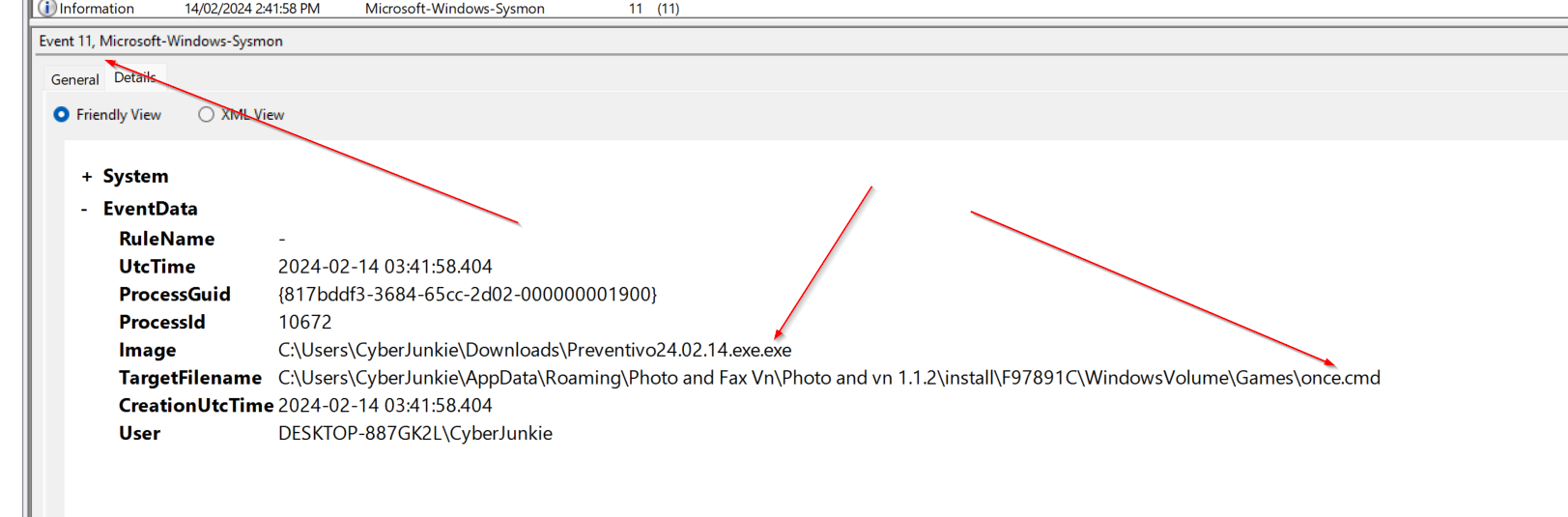
Answer: C:\Users\CyberJunkie\AppData\Roaming\Photo and Fax Vn\Photo and vn 1.1.2\install\F97891C\WindowsVolume\Games\once.cmd
Analysis:
-
File Creation Location: The malicious process created
once.cmdin a nested directory structure within theAppData\Roamingfolder, specifically under a path designed to mimic legitimate software installation directories. -
Tactical Purpose:
- Persistence: Batch scripts (
.cmd) are commonly used for persistence mechanisms - Obfuscation: The nested path structure (
WindowsVolume\Games) attempts to blend in with legitimate system directories - Execution Chain: This script may be executed as part of the malware’s operational sequence
- Persistence: Batch scripts (
-
IOCs:
- File Path:
C:\Users\CyberJunkie\AppData\Roaming\Photo and Fax Vn\Photo and vn 1.1.2\install\F97891C\WindowsVolume\Games\once.cmd - Creator Process:
C:\Users\CyberJunkie\Downloads\Preventivo24.02.14.exe.exe - File Type: Batch script (
.cmd)
- File Path:
-
Detection Considerations:
- Monitor for
.cmdfile creation inAppData\Roamingdirectories - Alert on batch scripts created by processes from user download directories
- Correlate file creation events with process execution chains
- Monitor for
Task 6: Malicious DNS Query Detection
Question: What domain did the malware attempt to connect to?
Objective: Identify command and control (C2) infrastructure through DNS query analysis.
Analysis Approach:
Sysmon Event ID 22 (DNS query) logs all DNS queries made by processes, allowing analysts to identify suspicious domain lookups that may indicate C2 communication or data exfiltration attempts.
Key Finding:
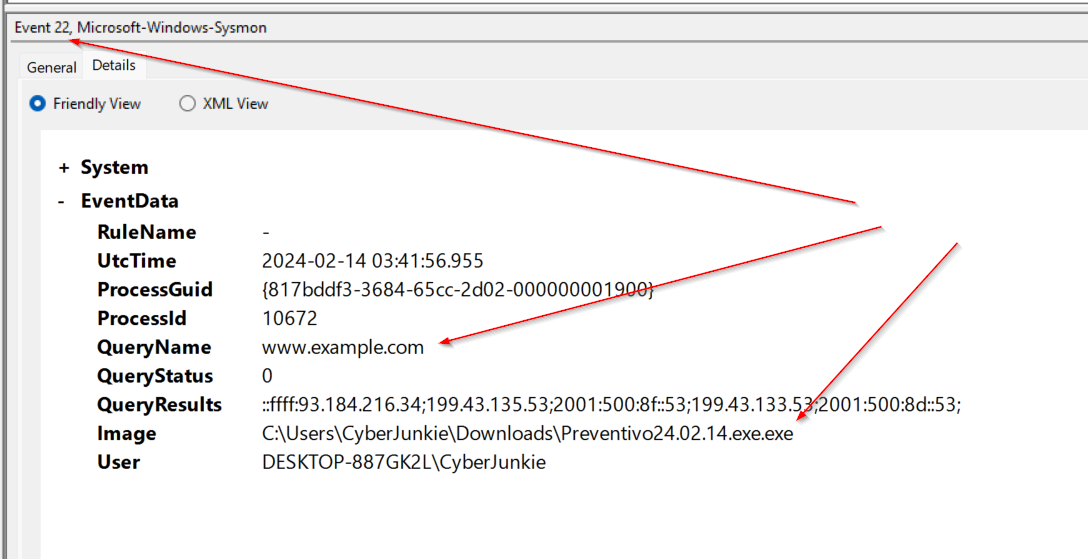
The Sysmon log reveals a DNS query from the malicious process:
EventID: 22
UtcTime: 2024-02-14 03:41:56.955
ProcessId: 10672
QueryName: www.example.com
QueryStatus: 0
QueryResults: ::ffff:93.184.216.34; 199.43.135.53; 2001:500:8f::53;
              199.43.133.53; 2001:500:8d::53
Image: C:\Users\CyberJunkie\Downloads\Preventivo24.02.14.exe.exe
User: DESKTOP-887GK2L\CyberJunkie
Answer: www.example.com
Analysis:
-
C2 Communication: The malicious process attempted to resolve
www.example.com, indicating potential command and control communication. -
DNS Resolution Details:
- Query Status: 0 (Success)
- Resolved IPs: Multiple IPv4 and IPv6 addresses were returned
- Primary IPv4: 93.184.216.34
-
Tactical Implications:
- C2 Infrastructure: The domain serves as the C2 endpoint for the malware
- Domain Fronting Potential: Using a legitimate-looking domain (
example.com) may be an attempt to blend in with normal traffic - Network Persistence: DNS queries occur before network connections, making this an early indicator of malicious activity
-
IOCs:
- Domain:
www.example.com - Resolved IPs: 93.184.216.34, 199.43.135.53, 199.43.133.53 (IPv4)
- Querying Process:
C:\Users\CyberJunkie\Downloads\Preventivo24.02.14.exe.exe - Process ID: 10672
- Domain:
-
Detection Value: DNS query logging provides early warning indicators before actual network connections are established, allowing for proactive blocking of C2 domains.
Task 7: Network Connection Destination IP
Question: What IP address did the malicious process attempt to reach?
Objective: Identify the specific C2 server IP address for network-based blocking and threat intelligence.
Analysis Approach:
Sysmon Event ID 3 (Network connection) logs all TCP/UDP connections, allowing analysts to identify the exact destination IP addresses and ports used for C2 communication. In this scenario only one event for network activity was logged.
Key Finding:
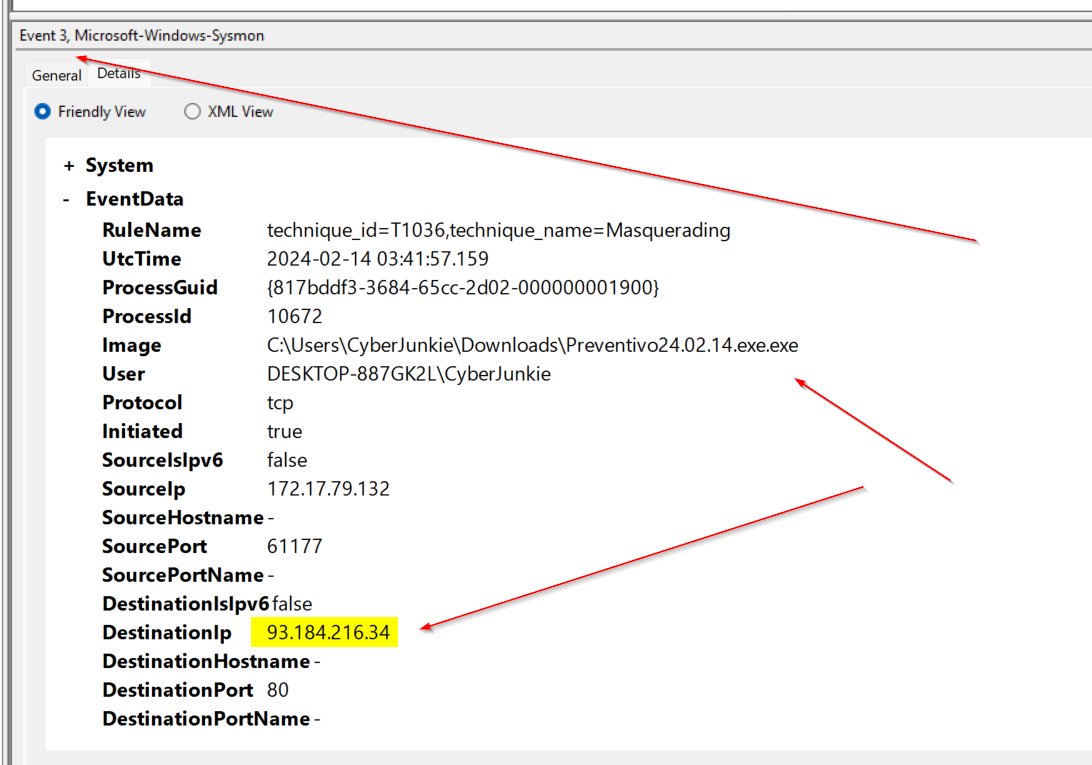
The Sysmon log reveals a network connection attempt:
RuleName: technique_id=T1036,technique_name=Masquerading
UtcTime: 2024-02-14 03:41:57.159
ProcessId: 10672
Image: C:\Users\CyberJunkie\Downloads\Preventivo24.02.14.exe.exe
User: DESKTOP-887GK2L\CyberJunkie
Protocol: tcp
Initiated: true
SourceIp: 172.17.79.132
SourcePort: 61177
DestinationIp: 93.184.216.34
DestinationPort: 80
Answer: 93.184.216.34
Analysis:
-
C2 Server Identification: The malicious process attempted to establish a TCP connection to
93.184.216.34on port 80 (HTTP). -
Connection Details:
- Protocol: TCP
- Source IP: 172.17.79.132 (victim machine)
- Source Port: 61177 (ephemeral port)
- Destination IP: 93.184.216.34
- Destination Port: 80 (HTTP)
-
MITRE ATT&CK Mapping:
- Technique ID: T1036 (Masquerading)
- Tactic: Defense Evasion
- The masquerading technique suggests the malware may be attempting to appear as legitimate traffic
-
Tactical Analysis:
- HTTP Communication: Port 80 indicates HTTP-based C2, which can blend in with normal web traffic
- Outbound Connection: The connection was initiated by the malicious process, confirming active C2 communication
- Timeline Correlation: This connection occurs shortly after the DNS query (Task 6), confirming the C2 flow
-
IOCs:
- Destination IP: 93.184.216.34
- Destination Port: 80
- Protocol: TCP
- Source Process:
C:\Users\CyberJunkie\Downloads\Preventivo24.02.14.exe.exe
-
Network Blocking: This IP address can be added to network blocklists and threat intelligence feeds to prevent future connections.
Task 8: Process Termination Time
Question: When did the malicious process terminate itself? (Format: YYYY-MM-DD HH:MM:SS)
Objective: Determine the process lifecycle and understand when the malware completed its execution cycle.
Analysis Approach:
Sysmon Event ID 5 (Process terminated) logs when processes exit, allowing analysts to track the complete lifecycle of malicious processes and understand execution timelines.
Key Finding:
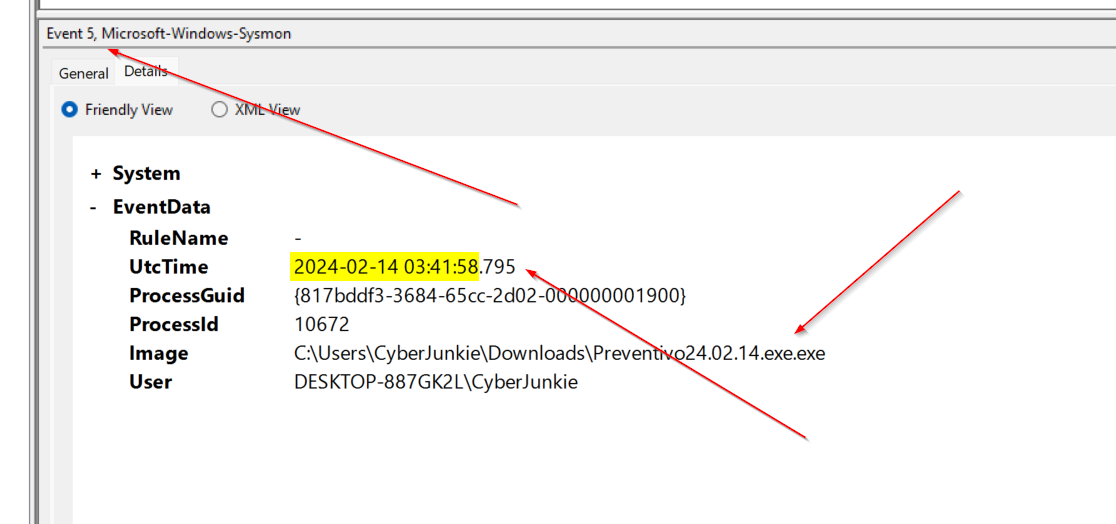
The Sysmon log reveals the process termination event:
EventID: 5
UtcTime: 2024-02-14 03:41:58.795
ProcessGuid: {817bddf3-3684-65cc-2d02-000000001900}
ProcessId: 10672
Image: C:\Users\CyberJunkie\Downloads\Preventivo24.02.14.exe.exe
User: DESKTOP-887GK2L\CyberJunkie
Answer: 2024-02-14 03:41:58
Analysis:
-
Process Lifecycle: The malicious process (
Preventivo24.02.14.exe.exe) terminated at2024-02-14 03:41:58.795, completing its execution cycle. -
Timeline Analysis:
- Process Start: Approximately 2024-02-14 03:41:56 (inferred from earlier events)
- DNS Query: 2024-02-14 03:41:56.955 (Task 6)
- Network Connection: 2024-02-14 03:41:57.159 (Task 7)
- Timestomping: 2024-02-14 03:41:58.404 (Task 4)
- Process Termination: 2024-02-14 03:41:58.795
- Total Execution Time: ~2-3 seconds
-
Tactical Implications:
- Rapid Execution: The malware completes its operations quickly, minimizing its footprint
- Self-Termination: The process terminates itself after completing its tasks, which is common in dropper malware
- Persistence: Despite self-termination, the malware likely established persistence through other means (e.g., the
once.cmdscript or MSI installation)
-
Forensic Value:
- Complete Timeline: Process termination events help establish complete attack timelines
- Execution Duration: Short execution times may indicate automated or scripted behavior
- Cleanup Indicators: Self-termination after completing tasks suggests sophisticated malware design
-
IOCs:
- Process:
C:\Users\CyberJunkie\Downloads\Preventivo24.02.14.exe.exe - Process ID: 10672
- Process GUID:
{817bddf3-3684-65cc-2d02-000000001900} - Termination Time: 2024-02-14 03:41:58.795
- Process:
Detection Insight:
Tracking process termination events is crucial for understanding malware behavior. The rapid execution and self-termination pattern is consistent with dropper malware that installs additional payloads and then removes itself to avoid detection.
DFIR Recommendations
Detection Rules
-
Monitor for suspicious MSI installations from user directories:
Event ID 1: Process creation Image: msiexec.exe CommandLine contains: AppData\Roaming -
Alert on executable files with double extensions:
File creation events (.exe.exe) Source: Downloads folder -
Monitor DNS queries to cloud storage services from browser processes:
DNS query: *dropbox-dns.com Process: firefox.exe, chrome.exe, edge.exe Followed by: File creation in Downloads -
Alert on timestomping events (Event ID 2):
Event ID 2: File creation time changed RuleName contains: Timestomp Process from user directories (Downloads, Temp) Significant time difference between PreviousCreationUtcTime and CreationUtcTime -
Monitor for script file creation in AppData directories:
Event ID 11: File creation TargetFilename contains: AppData\Roaming TargetFilename ends with: .cmd, .bat, .ps1, .vbs Process from Downloads or Temp directories -
Alert on DNS queries from suspicious processes:
Event ID 22: DNS query Image from user directories (Downloads, Temp, AppData) QueryName not in whitelist of legitimate domains -
Monitor network connections to suspicious IPs:
Event ID 3: Network connection Image from user directories DestinationPort: 80, 443, 8080, 8443 RuleName contains: Masquerading -
Track process termination for timeline analysis:
Event ID 5: Process terminated
Image from user directories
Correlate with file creation and network events
Short execution time (< 5 seconds) may indicate dropper malware
Mitigation Strategies
- Application Whitelisting: Implement application control to prevent execution from user directories like Downloads
- Network Monitoring: Monitor and log DNS queries to identify suspicious cloud storage access patterns
- User Education: Train users to be cautious of files downloaded from cloud storage links, especially with unusual extensions
- Behavioral Analysis: Deploy EDR solutions that can detect living-off-the-land techniques (LOLBins) like msiexec.exe being used for suspicious installations
Conclusion
This investigaton demonstrates the importance of Sysmon log analysis in detecting and understanding intrusion campaigns. Through comprehensive analysis of multiple event types, we were able to:
- Task 1: Quantify file creation activity (56 Event ID 11 events)
- Task 2: Identify the initial malicious process (
Preventivo24.02.14.exe.exe) and trace its execution chain - Task 3: Determine the distribution mechanism (Dropbox cloud storage)
- Task 4: Detect timestomping techniques used to evade detection
- Task 5: Locate additional payloads (
once.cmd) created by the malware - Task 6: Identify C2 domain (
www.example.com) through DNS query analysis - Task 7: Map network connections to C2 infrastructure (93.184.216.34:80)
- Task 8: Establish complete process lifecycle and execution timeline
Key Findings:
The UltraVNC-based campaign leveraged multiple evasion techniques:
- Trusted Service Abuse: Used Dropbox for distribution
- Living off the Land: Leveraged
msiexec.exefor payload installation - Defense Evasion: Implemented timestomping (T1070.006) and masquerading (T1036)
- Rapid Execution: Completed attack cycle in ~2-3 seconds
- Persistence: Established persistence through MSI installation and script files
This investigation highlights the critical need for:
- Comprehensive Logging: Multiple Sysmon event types provide complete visibility
- Event Correlation: Connecting process, file, network, and DNS events reveals the full attack chain
- Behavioral Analysis: Understanding execution patterns helps identify sophisticated malware
- Threat Hunting: Proactive analysis of logs can detect attacks before full compromise
References
- Sysmon Documentation - Event ID 1 (Process creation)
- Sysmon Documentation - Event ID 2 (File creation time changed)
- Sysmon Documentation - Event ID 3 (Network connection)
- Sysmon Documentation - Event ID 5 (Process terminated)
- Sysmon Documentation - Event ID 11 (File creation)
- Sysmon Documentation - Event ID 22 (DNS query)
- MITRE ATT&CK - Living off the Land (T1218)
- MITRE ATT&CK - Timestomping (T1070.006)
- MITRE ATT&CK - Masquerading (T1036)
- HTB Sherlock - Unit 42